Sunday, March 24, 2013

Blog 6: SoundHound

"Whats that song?"

File:SoundHound Mobile Icon.png

What is SoundHound?

SoundHound is an application that allows users to identify music by humming, singing or playing a recorded tracks. It is only available on mobile services, specifically iPhone and Androids. It was launched in 2007 by Melodis Corporation by Keyvan Mohajer. It was funded by Global Catalyst Partners, TransLink Capital and Walden Venture Capital. You can download this app for free on the Apple App Store, Google Play and Windows Marketplace for Mobile. You can also speak or type the name of the artist or song. 

SoundHound on an iPhone and an iPad

What Makes SoundHound Effective?

SoundHound's competitors is Shazam. But unlike Shazam, SoundHound can recognize music from singing, humming, speaking typing as well as from a recording. The company has a 'Sound2Sound" technology that helps with recognizing the song. This technology can make poorly-hummed performances to professional recording. 

The app also shows lyrics, links to the video of the song on YouTube, links on iTunes, the ability to launch Pandora Radio and recommendation to other songs. The feature that displays the lyrics is called LiveLyrics. You can double tap the points of the lyrics and this will move the song to the part where those lyrics are played.

There are three versions of this app, SoundHound, SoundHound Infinity and Hound. SoundHound is the free version but includes banner ads, SoundHound Infinity is $6.99 USD but does not have banner ads. Hound is only available to search songs by speaking into it.

Example of a song with lyrics

How to Use SoundHound?

  1. Download the app from the store convenient for you (for example the Apple App Store for iPhone users).
  2. Once you've download the app, take your device near the song that you want to identify.
  3. Play the song, and hold your device near it.
  4. Once the app recognizes the song you've exposed it to, it will how you options to what the song may be.
  5. Click on the one that you think is correct.
  6. You will be provided with options to lyrics, bookmark, share, buy and etc.

The Layout to various screens of SoundHound


Thursday, March 21, 2013

Blog 5: Snapchat

"There is a value in the ephemeral"

Snapchat logo.png
The Snapchat logo

What is Snapchat?

Snapchat is a photo messaging application. It was developed by four students in Stanford. This application allows users to take pictures, record videos, add texts and drawings to the pictures, and send them to another Snapchat user that they have befriended. The unique thing about this application is that the user sets a time limit for how long the person receiving can see it (it goes up to 10 seconds). The user that is receiving the photo cannot save the photo as they have to press onto the screen for the given amount of seconds in order to see the picture properly. After this the picture will be deleted from both of the users devices and the company's servers. The person who has sent the picture via Snapchat will get a notification that the recipient has seen the picture/video and opened their Snapchat. It will find the users friends through the user's contact list. The intent of this application was to have fun while avoiding someone else saving your pictures but you still being able to send them pictures.

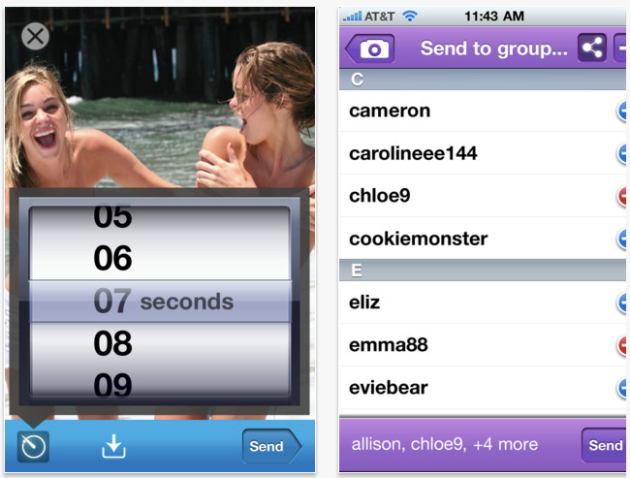
The part of Snapchat that allows you to select a time range and send it to a recipient

How to use Snapchat?

Using Snapchat becomes very easy once you get the hang of it. Firstly, you have to download the Snapchat app from the Apple App Store. This application is available on apple devices such as iPhone, iPod and iPad. Once you have downloaded this application you can sign up for it. You simply will need to create a username and set a password. Once you've done this, you can log on, and the main screen will come up. You can press on the camera icon and it will take you to a screen where you can take pictures, beside the big blue button you will see two icons. One icon looks like a note pad (left side), this is where you can click on and either view your friends, find friends or check settings. On the other side (right side) there will be a cube, this is the button that you can touch that'll take you back to your main page where all your received timings for the pictures/videos are listed. 

The main screen (right), your picture that can be edited (center) and your friend list (right)

If you want to send a picture, you will need to take a picture then you'll see a screen come up that will be your picture with a few options. With the pencil on the top left you can write on the picture, with the cross sign you delete the picture, with the arrow you save your picture onto your device and with the 3 button you can change the time limit. To add text you simply click on the picture and type. Once you're satisfied with your picture you can press send and pick who you want to send it to. You also have the option to team Snapchat.

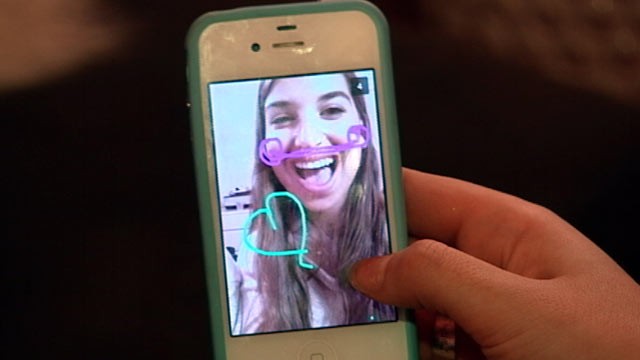
Drawings on the snap via the pencil tool

Opinions and Views on Snapchat

The users of Snapchat are usually between the ages 13 to 25 years old. 30 percent of snaps on Snapchat are sent in groups. There has been talks about how Snapchat could potentially make users send inappropriate pictures to one another as it cannot be saved. This topic was suggested by MSNBC. They have also said how Snapchat isn't as private as it seems. But on the other hand teens seem to love the application as it lets them send what they suppose are temporary pictures. Following is a video that shows the opinions: 


Blog 4: Instagram

Instagram

The Instagram Logo


What is Instagram?

Instagram on an iPhone
It is an online photo-sharing and social network service. It allows the users to take pictures, then apply effects via the "digital filters" and then share them in the service. It is a social network site such as Facebook or twitter whereby you have are able to post up pictures, have followers and follow others. The only difference is that this mainly focuses on pictures compared to other social networks. You can link your Instagram to your Twitter and to your Facebook to farther share the photos you have taken on this social network to variety of other social networks. Instagram always confines photos to a square shape kind of like  Kodak Instamatic and Polaroid images.

Systems it is Available on?

It was created by Kevin Systrom and Mike Krieger and it came out in October 2010. Instagram has over 100 million registered users of which 90 million are active users. You can download Instagram on the Apple App Store and Google Play. It was originally only supported by apple products like iPhone, iPad and iPod Touch but in April 2012 it was also available in Andriod camera phones that had 2.2 Froyo.

How to Use Instagram?

Instagram is an easy to use App. You can access Instagram from either your phone or your computer. All you have to do is go to the App Store and download the app for Instagram which is free. Once you've download the app, you can know create an account on the app. Once you have created an account, you can now easily take pictures and share them with people who you decide to follow and ones that decide to follow you. You can take pictures then upload them, and before you upload them you will have the chance to add a filter to it, to give it some effects and whatnot. Once you've done this you can go on ahead and approve the picture and click to share it. You can add location, caption or hashtags to the picture if you wish to. Now you can like other peoples pictures and comment on their pictures just how they can do to yours!

The Photo Filter on Instagram

Opinions on Instagram

People usually tend to give good feed backs when it comes to Instagram. Some of Instragam users have said "it is an unique way to share pictures or art with the world". On the other hand there are times when people don't usually like Instagram. This usually applies to people who are more cautious about photography and camera. They say "the quality nor the effects are as good". Following is the opinion of a youtuber: 


Friday, March 1, 2013

Blog 3: Edmodo

"Safe Social Networking for Schools"

How does the idea of learning online sound to you? Pick up assignments online, drop them off online, catch up with missed lessons, check your marks and overall just stay connected with all the aspects of a classroom and all your classmates! Well this is possible with the aide of Edmodo. Edomo is an online learning tool for students, teachers and parents. It is also free of cost.


What is Edmodo?

A lot of people may not be familiar with the concept of an online class, well that is exactly what Edmodo is. Edmodo is an online platform used by students, teachers and parents to learn that is free to use. It is a social network service. It was founded in September 2008. Edmodo doesn't only come in English, but it also comes in Portuguese, Spanish, German, Greek and French.


What is Edmodo used for?

What Edmodo has to Offer
Edmodo is an online classroom. Once you've made an online account and joined your classroom online(which we will get into later), you can easily connect with everything. You can see all the things you've missed if you were not in class, pick up new assignments and communicate with group members.  It can help you out in classwork such as reading, assignments, paper-studying and erectile-learning.

Click to Find Out 20 Ways of Using Edmodo!


Importance of Edmodo

Edmodo is an important technology tool. It provides various benefits. Through the help of Edmodo you can have classes online. Students can do the following:

  • Post assignments
  • Create polls for students response
  • Embed videos
  • Exchange messages with other students/teacher
  • Create smaller groups for things such as group works
  • Collaborate in groups
  • Keep up with deadlines
  • Critique each other's work to help one another
  • Post creative writing 
  • Browse easily
  • Use emoticons
  • Stay connected and aware of what is going on in class
  • It is free and does not cost you a penny

Asides from all that Edmodo is said to "connect with students and help them ceate norms and reflect on how different online actions will be interpreted." It enables a secure place for teachers and students to connect and collaborate, share information and education applications, and access homework, grades, class discussions and notifications. The goal of Edmodo is to aide teachers use the power of social media to teach by customizing a classroom for each and every individual student.

How to use Edmodo?

These are the steps you will help you understand Edmodo in a classroom and how to use it:


  1. Go to the Edmodo website and sign up for free! http://www.edmodo.com/
  2. Sign up as a teacher.
  3. Get the code needed for all your students to also connect in your online classroom.
  4. Once you're gotten the code, share it with your students.
  5. Now it is the turn for the students to sign up.
  6. When you're signing up as a student you will require a username as well as a password and they will ask for you classroom code. This is when you share the code that your teacher has shared with the class.
  7. Once you're signed in, you'll be connected to the classroom.
  8. You can now see all your peers, assignments and class discussions.
  9. As a teacher to post an assignment, video or such you can easy go to your profile and write on the "type your note here.."
  10. The Teacher's Profile on Edmodo
  11. You will see you also have the option of sharing pictures and link on the top corner.
  12. Once you as a teacher have shared something to your class, they can too now view it.
  13. As a student you can see the assignments your teacher wants you do to and when they're due on your homepage (the home buttom on the top left of the page).
  14. You can download the assignment, work on it and drop it off by pressing in the turn it in button and uploading the document.
  15. Once the work has been marked or you have a new assignment due, it will show in your notifications on the top right corner.
  16. If your teacher wants they can create groups whereby you can collaborate with partners in labs, project based groups, literature circles and etc.
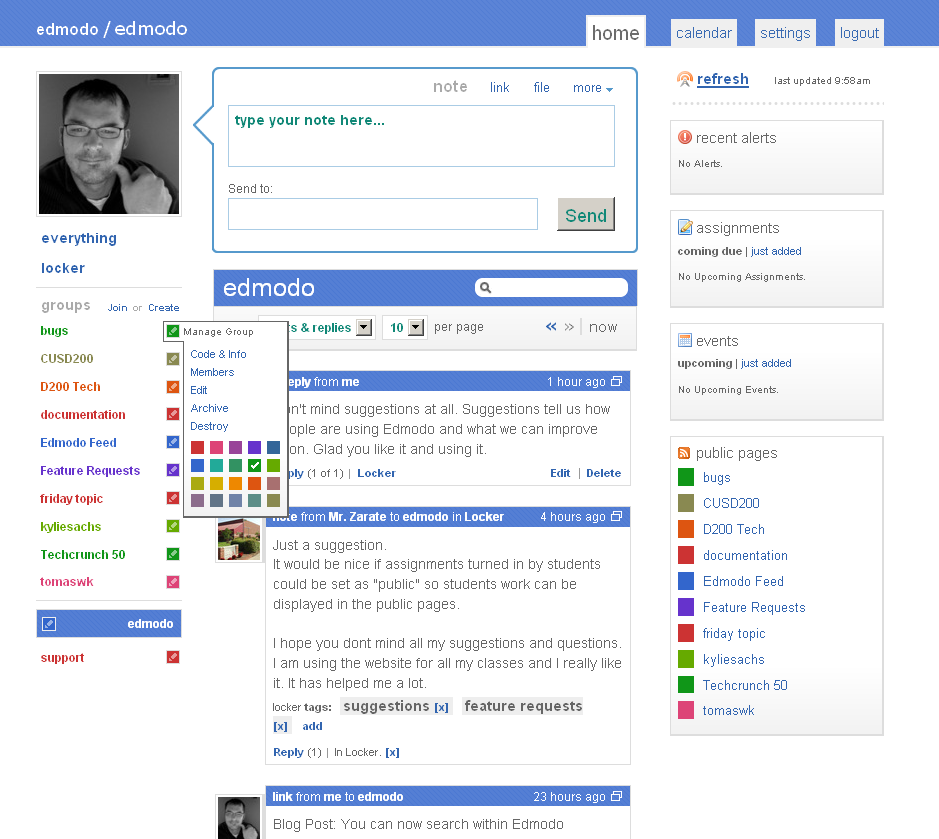
The Homepage of Edmodo Whereby You Can See Assignments and Such

What People Have to Say About Edmodo

People tend of love Edmodo as they say it is a helpful educational device. Parents say it is a good way of using social networking. Students say it is a reasonable tool that is easily accessible which makes it easier for them to do assignment and keep up with the discussions going on in the classroom. Teachers also say the same as it also makes marking easier for them and keeps them for organized. It is a fun way of doing work in class.


Thursday, February 21, 2013

Blog 2: Skype

"Take a Deep Breath"

Welcome to the world of technology where meetings take place over video conferences and you are able to wish your grandmother in Germany happy birthday while seeing her from Canada with just one download. Have you ever wanted to see someone while speaking to them even when they're miles apart from you? Well with tools such as Skype this is possible! Skye is a great communication tool that you can use for free!

                                                                 What is Skype?


Skype is a very useful social networking tool developed by Microsoft that enables us to communicate with friends, colleague and families by using voice (via a microphone), video (via a webcam) and instant messaging. Skype was initially released to the public in August 2003. It is highly accessible as it is available in the follow: Android, iOS, Linux, Microsoft Windows, OS X, Symbian, Blackberry OS and HP WebOS. This service easily allows us to communicate with whoever from where ever we are as long as we have an operating system that is able to run this software and has internet. While calls from a Skype user to another Skype user is free, if a Skype user was to call a land telephone or a mobile phone it may be charged. The charge with show up in the user’s debit card. Skype also lets user send files to each other and video conference. Skype lets you communicate with Skype members from other any where in the world. There are about 31 million Skype users as of January 2012. Below is a chart of Skype statistics:

The Skype Statistic Chart


Importance of Skype and its Features


The Skype Layout
We may not realize but Skype is a very important tool today in our society and for most parts comes free of charge. It is important as it lets us communicate and keep up with our surroundings hassle free. Skype is an organized tool as it has a layout that is easy to understand it is quite well labeled. As mentioned earlier it allows us to communicate through voice, video/webcam and instant messaging. It all allows group chats, emotions, and it stores all your chat history and editing of previous messages. All these messages are dated and timed. One can easily leave you an offline message and you will receive it as soon as you log into your account. You can change your profile picture and add in information so that it is easier for a friend to find you on Skype!Skype can connect to Facebook and work's with MSN. It supports conference up to 25 people at once. Group calling is premium and you will be charged where as if you were to video chat with only one person it would be free. It can call all numbers but however it cannot call emergency numbers such as 911.

What are people’s opinions about Skype?


A Layout of the Skype Instant Messaging
People tend to love Skype as it helps them connect with people all around the world and in some cases it’s cost free. “Ideal for making long distance video calls country to country with immediate family especially where kids are involved”. “In January 2010, Josh Silverman was recognized for his accomplishment in revitalizing Skype by being named First Runner Up in the TechCrunch “Crunchies” award for the “Best CEO”, beaten only by Mark Pincus of Zynga”. People have said it is a “cheap” way for them to connect with family around the world. I personally really like Skype as it lets me connect with my peers and family.


How to download and use Skype?


To download Skype all you have to do is go on their website: http://www.skype.com/en/ and press join! This will help you create an account. Once you've put in all the required information and have chosen a username and password, you are good to go! If you require additional help, Skype will provide you with help, and to get to that all you have to do is press “Lean More about Skype” or “Support”. Once you've made an account it is time to download the software. You can press download on the top of the website and download it safely. If you’re using it via a phone or tablet you need to download the Skype app which you will find in the app store. If you want to get a paid account for more option you can do so when you sign up for Skype. 

Once you've logged onto Skype you can add friends and connect with people. To find friends on Skype press the find friends in Skype button. You can find them by their email address, phone number name or even Skype user name. If you personally want to add a person you can press add contacts. Once they've accepted your friend request you will see them under the friends list. Now you can click on their name and a screen on the right hand side will come up that has the options of calling, video calling and instant messaging. Now you can do whatever you wish to just by clicking the buttons.

A Video Call Using Skype


Here is a video that will help first time Skype users explore their way in Skype!


The Skype App


Monday, February 18, 2013

Blog 1: Evernote

Evernote 

"Remember Everything"

Summary

Evernote is an application designed for note-taking and documenting. Its primary focus is to collect, organize and retrieve information. The types of notes Evernote captures are formatted text, a full webpage or webpage excerpt, a photograph, a voice memo, a handwritten note or even a file attachment. Organization is one of Evernote's main benefits as you can sort all your files in folders, then tag, annotate, edit, export, search and comment on them. The data that you have currently saved will be secure on your account as long as you want to make use of it, thus retrieving important data is more relaxing. Evernote is an effective clipping and organizing tool.

Opinion/Evaluation/Reflection

1. Ask you to research user reviews, testimonials on each product's page
2. Ask you to analyze costs versus benefits.  
3. Ask you to reflect on your different learning styles…

People seem to love this information technology tool as in come in great use. It saves time and is easy to use! With a few clicks you can simply find all the documents or research you need. "Evernote swept the Mobile Application category, winning both the Webby and People's Voice Webby awards." It can synchronize with all platforms (Windows, Mac, and mobile devices) which makes it easily accessible. Evernote a handy tool for those who aren't as well in organizing and remembering. Evernote is quite affordable. It is free until you start to use a certain amount of space, then Evernote will charge you. The Evernote web-clipper is free to install and runs smoothly on either Google Chrome or Firefox on a computer. Evernote is by far the best organizing tool. It lets you keep track of your work online effortlessly. You can create folders for further organization or re-edit saved work or articles in an instant. I will definitely keep using this tool as it makes finding work and organizing it less time consuming for me. This informational technology tool is very easy to understand as there are visuals and instructions available. The tool itself is very clear and you won't lose your way while navigating it. There are labels and visuals that tell you the functions of certain keys and once you have that figured out working them isn't as difficult. You can practically learn the basics of the tool by yourself as it is simple. Suppose you want to clip an article online, you enter the URL of the website/article you would like to clip and save it under your desired folder. You can later come back and re-edit the article and re-use it.  Evernote is accessible to almost everyone. You can use it to organize your own personal documents (such as pictures), your business documents or your research documents. It can benefit students when they're researching and if they ever need to come back to a certain site for certain purposes such as writing a bibliography they can easily do so. It is however not accessible to everyone; people who are visually impaired will not be able to use this tool. Overall, Evernote is a great, time-saving tool.